Ланцюжки елементів у ConstraintLayout
ConstraintLayout дає змогу організувати розташування елементів у ряд по горизонталі або по вертикалі, або те, що в Android називається chains або ланцюжки. Ми можемо по ланцюжку встановити позиціонування одного елемента відносно іншого і таким чином організувати ряд елементів.
Горизонтальний ланцюжок елементів
Наприклад, ряд елементів по горизонталі:
<?xml version="1.0" encoding="utf-8"?>
<androidx.constraintlayout.widget.ConstraintLayout
    xmlns:android="http://schemas.android.com/apk/res/android"
    xmlns:app="http://schemas.android.com/apk/res-auto"
    xmlns:tools="http://schemas.android.com/tools"
    android:layout_width="match_parent"
    android:layout_height="match_parent"
    tools:context=".MainActivity">

    <TextView
        android:id="@+id/textView1"
        android:layout_width="wrap_content"
        android:layout_height="wrap_content"
        android:background="#efefef"
        android:text="First"
        android:textSize="30sp"
        app:layout_constraintRight_toLeftOf="@id/textView2"
        app:layout_constraintLeft_toLeftOf="parent"
        app:layout_constraintTop_toTopOf="parent" />

    <TextView
        android:id="@+id/textView2"
        android:layout_width="wrap_content"
        android:layout_height="wrap_content"
        android:background="#e0e0e0"
        android:text="Second"
        android:textSize="30sp"
        app:layout_constraintLeft_toRightOf="@id/textView1"
        app:layout_constraintRight_toLeftOf="@id/textView3"
        app:layout_constraintTop_toTopOf="parent" />

    <TextView
        android:id="@+id/textView3"
        android:layout_width="wrap_content"
        android:layout_height="wrap_content"
        android:background="#efefef"
        android:text="Third"
        android:textSize="30sp"
        app:layout_constraintLeft_toRightOf="@id/textView2"
        app:layout_constraintRight_toRightOf="parent"
        app:layout_constraintTop_toTopOf="parent" />

</androidx.constraintlayout.widget.ConstraintLayout>
У підсумку елементи ланцюжка рівномірно будуть розтягнуті по всій ширині контейнера:
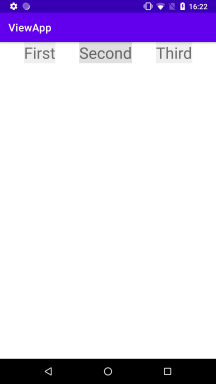
Горизонтальний ланцюжок елементів досягається за рахунок двох факторів:
- Перший елемент вирівнюється відносно лівої межі контейнера (
app:layout_constraintLeft_toLeftOf="parent"), останній елемент вирівнюється відносно правої межі контейнера (app:layout_constraintRight_toRightOf="parent"). - Завдяки встановленню атрибутів
app:layout_constraintLeft_toRightOfтаapp:layout_constraintRight_toLeftOfрозташовуємо один елемент праворуч або ліворуч від іншого.
Крім того, ConstraintLayout дає змогу налаштувати положення елементів усередині ланцюжка. Для цього застосовується атрибут layout_constraintHorizontal_chainStyle, який може набувати таких значень:
spread: значення за замовчуванням, за якого елементи ланцюжка рівномірно розтягуються по всій довжині ланцюжка, як у прикладі вищеspread_inside: перший і останній елемент ланцюжка примикають до меж контейнераpacked: елементи ланцюжка розташовуються впритул один до одного.
Наприклад, застосуємо значення spread_inside:
<?xml version="1.0" encoding="utf-8"?>
<androidx.constraintlayout.widget.ConstraintLayout xmlns:android="http://schemas.android.com/apk/res/android"
    xmlns:app="http://schemas.android.com/apk/res-auto"
    xmlns:tools="http://schemas.android.com/tools"
    android:layout_width="match_parent"
    android:layout_height="match_parent"
    tools:context=".MainActivity">

    <TextView
        android:id="@+id/textView1"
        android:layout_width="wrap_content"
        android:layout_height="wrap_content"
        android:background="#efefef"
        android:text="First"
        android:textSize="30sp"

        app:layout_constraintHorizontal_chainStyle="spread_inside"

        app:layout_constraintRight_toLeftOf="@id/textView2"
        app:layout_constraintLeft_toLeftOf="parent"
        app:layout_constraintTop_toTopOf="parent" />

    <TextView
        android:id="@+id/textView2"
        android:layout_width="wrap_content"
        android:layout_height="wrap_content"
        android:background="#e0e0e0"
        android:text="Second"
        android:textSize="30sp"
        app:layout_constraintLeft_toRightOf="@id/textView1"
        app:layout_constraintRight_toLeftOf="@id/textView3"
        app:layout_constraintTop_toTopOf="parent" />

    <TextView
        android:id="@+id/textView3"
        android:layout_width="wrap_content"
        android:layout_height="wrap_content"
        android:background="#efefef"
        android:text="Third"
        android:textSize="30sp"
        app:layout_constraintLeft_toRightOf="@id/textView2"
        app:layout_constraintRight_toRightOf="parent"
        app:layout_constraintTop_toTopOf="parent" />

</androidx.constraintlayout.widget.ConstraintLayout>
Причому в цьому випадку достатньо встановити атрибут у першого елемента ланцюжка:
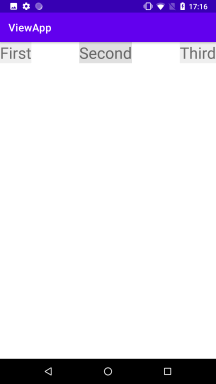
Значення packed:
<?xml version="1.0" encoding="utf-8"?>
<androidx.constraintlayout.widget.ConstraintLayout xmlns:android="http://schemas.android.com/apk/res/android"
    xmlns:app="http://schemas.android.com/apk/res-auto"
    xmlns:tools="http://schemas.android.com/tools"
    android:layout_width="match_parent"
    android:layout_height="match_parent"
    tools:context=".MainActivity">

    <TextView
        android:id="@+id/textView1"
        android:layout_width="wrap_content"
        android:layout_height="wrap_content"
        android:background="#efefef"
        android:text="First"
        android:textSize="30sp"

        app:layout_constraintHorizontal_chainStyle="packed"

        app:layout_constraintRight_toLeftOf="@id/textView2"
        app:layout_constraintLeft_toLeftOf="parent"
        app:layout_constraintTop_toTopOf="parent" />

    <TextView
        android:id="@+id/textView2"
        android:layout_width="wrap_content"
        android:layout_height="wrap_content"
        android:background="#e0e0e0"
        android:text="Second"
        android:textSize="30sp"
        app:layout_constraintLeft_toRightOf="@id/textView1"
        app:layout_constraintRight_toLeftOf="@id/textView3"
        app:layout_constraintTop_toTopOf="parent" />

    <TextView
        android:id="@+id/textView3"
        android:layout_width="wrap_content"
        android:layout_height="wrap_content"
        android:background="#efefef"
        android:text="Third"
        android:textSize="30sp"
        app:layout_constraintLeft_toRightOf="@id/textView2"
        app:layout_constraintRight_toRightOf="parent"
        app:layout_constraintTop_toTopOf="parent" />

</androidx.constraintlayout.widget.ConstraintLayout>
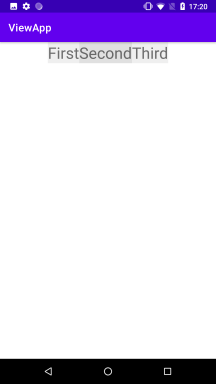
Вага елемента
Варто зазначити, що вище в елементів встановлювалася ширина, необхідна для їхнього вмісту. Але ми могли б встановити і нульову ширину, тоді елементи рівномірно б розподілялися по всьому ланцюжку без утворення проміжків між ними.
<?xml version="1.0" encoding="utf-8"?>
<androidx.constraintlayout.widget.ConstraintLayout xmlns:android="http://schemas.android.com/apk/res/android"
    xmlns:app="http://schemas.android.com/apk/res-auto"
    xmlns:tools="http://schemas.android.com/tools"
    android:layout_width="match_parent"
    android:layout_height="match_parent"
    tools:context=".MainActivity">

    <TextView
        android:id="@+id/textView1"
        android:layout_width="0dp"
        android:layout_height="wrap_content"
        android:background="#efefef"
        android:text="First"
        android:textSize="30sp"
        app:layout_constraintRight_toLeftOf="@id/textView2"
        app:layout_constraintLeft_toLeftOf="parent"
        app:layout_constraintTop_toTopOf="parent" />

    <TextView
        android:id="@+id/textView2"
        android:layout_width="0dp"
        android:layout_height="wrap_content"
        android:background="#e0e0e0"
        android:text="Second"
        android:textSize="30sp"
        app:layout_constraintLeft_toRightOf="@id/textView1"
        app:layout_constraintRight_toLeftOf="@id/textView3"
        app:layout_constraintTop_toTopOf="parent" />

    <TextView
        android:id="@+id/textView3"
        android:layout_width="0dp"
        android:layout_height="wrap_content"
        android:background="#efefef"
        android:text="Third"
        android:textSize="30sp"
        app:layout_constraintLeft_toRightOf="@id/textView2"
        app:layout_constraintRight_toRightOf="parent"
        app:layout_constraintTop_toTopOf="parent" />

</androidx.constraintlayout.widget.ConstraintLayout>
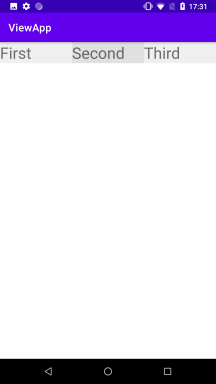
У цьому разі значення атрибута app:layout_constraintHorizontal_chainStyle не відіграє жодної ролі, тому що всі елементи отже розтягуються по всьому ланцюжку.
Однак така поведінка може не влаштовувати, наприклад, ми хочемо, щоб один елемент був удвічі більшим за інший. І в цьому випадку ми можемо за допомогою атрибута layout_constraintHorizontal_weight. Однак слід враховувати, що при застосуванні ваг у елементів, вони повинні мати нульову ширину:
<?xml version="1.0" encoding="utf-8"?>
<androidx.constraintlayout.widget.ConstraintLayout xmlns:android="http://schemas.android.com/apk/res/android"
    xmlns:app="http://schemas.android.com/apk/res-auto"
    xmlns:tools="http://schemas.android.com/tools"
    android:layout_width="match_parent"
    android:layout_height="match_parent"
    tools:context=".MainActivity">

    <TextView
        android:id="@+id/textView1"
        android:layout_width="0dp"
        android:layout_height="wrap_content"
        android:background="#efefef"
        android:text="First"
        android:textSize="30sp"

        app:layout_constraintHorizontal_weight="1"

        app:layout_constraintRight_toLeftOf="@id/textView2"
        app:layout_constraintLeft_toLeftOf="parent"
        app:layout_constraintTop_toTopOf="parent" />

    <TextView
        android:id="@+id/textView2"
        android:layout_width="0dp"
        android:layout_height="wrap_content"
        android:background="#e0e0e0"
        android:text="Second"
        android:textSize="30sp"

        app:layout_constraintHorizontal_weight="2"

        app:layout_constraintLeft_toRightOf="@id/textView1"
        app:layout_constraintRight_toLeftOf="@id/textView3"
        app:layout_constraintTop_toTopOf="parent" />

    <TextView
        android:id="@+id/textView3"
        android:layout_width="0dp"
        android:layout_height="wrap_content"
        android:background="#efefef"
        android:text="Third"
        android:textSize="30sp"

        app:layout_constraintHorizontal_weight="1"

        app:layout_constraintLeft_toRightOf="@id/textView2"
        app:layout_constraintRight_toRightOf="parent"
        app:layout_constraintTop_toTopOf="parent" />

</androidx.constraintlayout.widget.ConstraintLayout>
Як значення атрибут layout_constraintHorizontal_weight приймає число - вагу елемента. Так, у цьому випадку вага першого елемента - 1, вага другого - 2, а вага третього - 1. Тому вся ширина контейнера буде умовно поділена на 1 + 2 + 1 = 4 частини, з яких по одній частині займуть перший і третій елемент, а другий займе 2 частини, тобто другий елемент буде вдвічі більшим за перший і третій елемент.
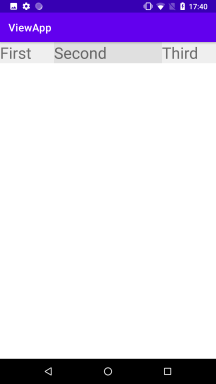
У принципі ми можемо залишити елементи і з шириною "wrap_content" або конкретним значенням, відмінним від "0dp", просто в цьому разі вони не братимуть участі в розподілі простору контейнера, а вага в такого елемента ролі не відіграватиме.
Вертикальний ланцюжок
Для утворення вертикального ланцюжка також має дотримуватися дві умови:
- Перший елемент вирівнюється щодо верхньої межі контейнера (
app:layout_constraintTop_toTopOf="parent"), останній елемент вирівнюється щодо нижньої межі контейнера (app:layout_constraintBottom_toBottomOf="parent"). - Завдяки встановленню атрибутів
app:layout_constraintBottom_toTopOfіapp:layout_constraintBottom_toTopOfрозташовуємо один елемент поверх іншого.
Щоб налаштувати положення елементів усередині ланцюжка, застосовується атрибут layout_constraintVertical_chainStyle, який може набувати таких значень:
spread: значення за замовчуванням, за якого елементи ланцюжка рівномірно розтягуються по всій довжині ланцюжкаspread_inside: перший і останній елемент ланцюжка примикають до кордонів контейнераpacked: елементи ланцюжка прилягають впритул один до одного.
Наприклад, вертикальний ланцюжок зі значенням за замовчуванням - spread:
<?xml version="1.0" encoding="utf-8"?>
<androidx.constraintlayout.widget.ConstraintLayout xmlns:android="http://schemas.android.com/apk/res/android"
    xmlns:app="http://schemas.android.com/apk/res-auto"
    xmlns:tools="http://schemas.android.com/tools"
    android:layout_width="match_parent"
    android:layout_height="match_parent"
    tools:context=".MainActivity">

    <TextView
        android:id="@+id/textView1"
        android:layout_width="200dp"
        android:layout_height="wrap_content"
        android:background="#efefef"
        android:text="First"
        android:textSize="30sp"
        app:layout_constraintBottom_toTopOf="@id/textView2"
        app:layout_constraintLeft_toLeftOf="parent"
        app:layout_constraintRight_toRightOf="parent"
        app:layout_constraintTop_toTopOf="parent" />

    <TextView
        android:id="@+id/textView2"
        android:layout_width="200dp"
        android:layout_height="wrap_content"
        android:background="#e0e0e0"
        android:text="Second"
        android:textSize="30sp"
        app:layout_constraintTop_toBottomOf="@id/textView1"
        app:layout_constraintBottom_toTopOf="@id/textView3"
        app:layout_constraintLeft_toLeftOf="parent"
        app:layout_constraintRight_toRightOf="parent" />

    <TextView
        android:id="@+id/textView3"
        android:layout_width="200dp"
        android:layout_height="wrap_content"
        android:background="#efefef"
        android:text="Third"
        android:textSize="30sp"

        app:layout_constraintTop_toBottomOf="@id/textView2"
        app:layout_constraintLeft_toLeftOf="parent"
        app:layout_constraintRight_toRightOf="parent"
        app:layout_constraintBottom_toBottomOf="parent" />

</androidx.constraintlayout.widget.ConstraintLayout>
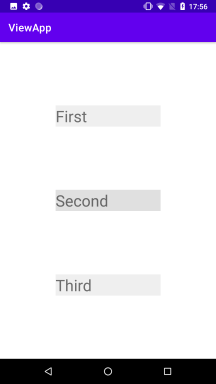
Також достатньо застосувати до першого елемента ланцюжка атрибут layout_constraintVertical_chainStyle, щоб змінити положення елементів:
<TextView
        android:id="@+id/textView1"
        android:layout_width="200dp"
        android:layout_height="wrap_content"
        android:background="#efefef"
        android:text="First"
        android:textSize="30sp"

        app:layout_constraintVertical_chainStyle="spread_inside"

        app:layout_constraintBottom_toTopOf="@id/textView2"
        app:layout_constraintLeft_toLeftOf="parent"
        app:layout_constraintRight_toRightOf="parent"
        app:layout_constraintTop_toTopOf="parent" />
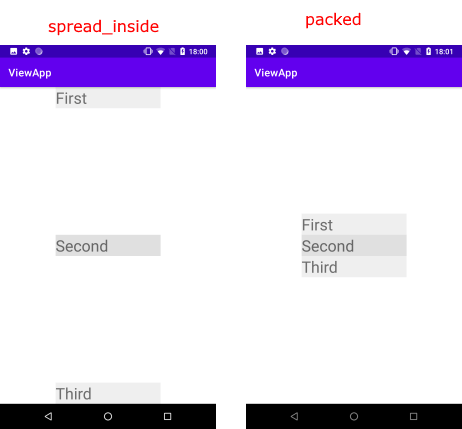
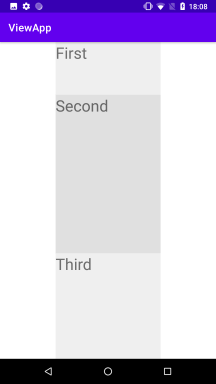
І як при горизонтальній орієнтації у вертикальному ланцюжку можна використовувати вагу елементів за допомогою атрибута layout_constraintVertical_weight. Для встановлення ваги в елемента в якості висоти має бути встановлене значення 0dp
<?xml version="1.0" encoding="utf-8"?>
<androidx.constraintlayout.widget.ConstraintLayout xmlns:android="http://schemas.android.com/apk/res/android"
    xmlns:app="http://schemas.android.com/apk/res-auto"
    xmlns:tools="http://schemas.android.com/tools"
    android:layout_width="match_parent"
    android:layout_height="match_parent"
    tools:context=".MainActivity">

    <TextView
        android:id="@+id/textView1"
        android:layout_width="200dp"
        android:layout_height="0dp"
        android:background="#efefef"
        android:text="First"
        android:textSize="30sp"
        app:layout_constraintVertical_weight="1"
        app:layout_constraintBottom_toTopOf="@id/textView2"
        app:layout_constraintLeft_toLeftOf="parent"
        app:layout_constraintRight_toRightOf="parent"
        app:layout_constraintTop_toTopOf="parent" />

    <TextView
        android:id="@+id/textView2"
        android:layout_width="200dp"
        android:layout_height="0dp"
        android:background="#e0e0e0"
        android:text="Second"
        android:textSize="30sp"
        app:layout_constraintVertical_weight="3"
        app:layout_constraintTop_toBottomOf="@id/textView1"
        app:layout_constraintBottom_toTopOf="@id/textView3"
        app:layout_constraintLeft_toLeftOf="parent"
        app:layout_constraintRight_toRightOf="parent" />

    <TextView
        android:id="@+id/textView3"
        android:layout_width="200dp"
        android:layout_height="0dp"
        android:background="#efefef"
        android:text="Third"
        android:textSize="30sp"
        app:layout_constraintVertical_weight="2"
        app:layout_constraintTop_toBottomOf="@id/textView2"
        app:layout_constraintLeft_toLeftOf="parent"
        app:layout_constraintRight_toRightOf="parent"
        app:layout_constraintBottom_toBottomOf="parent" />

</androidx.constraintlayout.widget.ConstraintLayout>
Сукупна вага елементів у цьому випадку 1 + 3 + 2 = 6. Тому вся висота контейнера ділитиметься на 6 частин, з яких перший елемент займе 1 частину, другий - 3 частини і третій - 2 частини відповідно до своєї ваги.