ScrollView
Контейнер ScrollView призначений для створення прокрутки для такого інтерфейсу, усі елементи якого одномоментно не можуть поміститися на екрані пристрою. ScrollView може вміщати тільки один елемент, тому якщо ми хочемо розмістити кілька елементів, то їх треба помістити в який-небудь контейнер.
Наприклад, визначимо ряд TextView з великими текстами:
<ScrollView
    xmlns:android="http://schemas.android.com/apk/res/android"
    android:layout_width="match_parent"
    android:layout_height="match_parent">
    <LinearLayout
        android:layout_width="match_parent"
        android:layout_height="match_parent"
        android:orientation="vertical"
        >
        <TextView
            android:layout_width="wrap_content"
            android:layout_height="wrap_content"
            android:text="What is Lorem Ipsum?"
            android:textSize="34sp" />
        <TextView
            android:layout_width="wrap_content"
            android:layout_height="wrap_content"
            android:text="Lorem Ipsum is simply dummy text of the printing and typesetting industry...like Aldus PageMaker including versions of Lorem Ipsum."
            android:textSize="14sp"/>
        <TextView
            android:layout_width="wrap_content"
            android:layout_height="wrap_content"
            android:text="Why do we use it?"
            android:layout_marginTop="16dp"
            android:textSize="34sp"/>
        <TextView
            android:layout_width="wrap_content"
            android:layout_height="wrap_content"
            android:text="Lorem Ipsum is simply dummy text of the printing and typesetting industry...like Aldus PageMaker including versions of Lorem Ipsum."
            android:textSize="14sp"/>
        <TextView
            android:layout_width="wrap_content"
            android:layout_height="wrap_content"
            android:text="Where can I get some?"
            android:layout_marginTop="16dp"
            android:textSize="34sp"/>
        <TextView
            android:layout_width="wrap_content"
            android:layout_height="wrap_content"
            android:text="There are many variations of passages of Lorem Ipsum available ... or non-characteristic words etc."
            android:textSize="14sp"/>
    </LinearLayout>
</ScrollView>
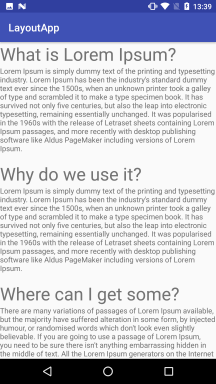
Оскільки в ScrollView можна помістити тільки один елемент, то всі TextView укладені в LinearLayout. І якщо площа екрана буде недостатньою, щоб помістити весь вміст LinearLayout, то стане доступною прокрутка:
Створення ScrollView програмно в коді MainActivity:
package com.example.viewapp;

import androidx.appcompat.app.AppCompatActivity;

import android.os.Bundle;
import android.view.ViewGroup;
import android.widget.ScrollView;
import android.widget.TextView;

public class MainActivity extends AppCompatActivity {

    @Override
    protected void onCreate(Bundle savedInstanceState) {
        super.onCreate(savedInstanceState);
        //setContentView(R.layout.activity_main);

        ScrollView scrollView = new ScrollView(this);

        TextView textView = new TextView(this);
        textView.setText("Lorem Ipsum is simply dummy text of the printing and typesetting industry...like Aldus PageMaker including versions of Lorem Ipsum.");
        textView.setLayoutParams(new ViewGroup.LayoutParams
                (ViewGroup.LayoutParams.WRAP_CONTENT, ViewGroup.LayoutParams.WRAP_CONTENT));
        textView.setTextSize(26);
        scrollView.addView(textView);
        setContentView(scrollView);
    }
}
Приклад
<ScrollView
    xmlns:android="http://schemas.android.com/apk/res/android"
    android:layout_width="match_parent"
    android:layout_height="match_parent"
    android:fillViewport="true"
    android:background="@color/white">

    <!-- Контейнер для елементів -->
    <LinearLayout
        android:layout_width="match_parent"
        android:layout_height="wrap_content"
        android:orientation="vertical"
        android:padding="16dp">

        <!-- Заголовок форми -->
        <TextView
            android:id="@+id/formTitle"
            android:layout_width="wrap_content"
            android:layout_height="wrap_content"
            android:text="Реєстрація"
            android:textSize="24sp"
            android:textStyle="bold"
            android:gravity="center"
            android:layout_gravity="center"
            android:paddingBottom="16dp" />

        <!-- Поле для введення імені -->
        <EditText
            android:id="@+id/nameInput"
            android:layout_width="match_parent"
            android:layout_height="wrap_content"
            android:hint="Ім'я"
            android:inputType="textPersonName"
            android:padding="12dp"
            android:background="@drawable/input_background"
            android:layout_marginBottom="8dp" />

        <!-- Поле для введення email -->
        <EditText
            android:id="@+id/emailInput"
            android:layout_width="match_parent"
            android:layout_height="wrap_content"
            android:hint="Email"
            android:inputType="textEmailAddress"
            android:padding="12dp"
            android:background="@drawable/input_background"
            android:layout_marginBottom="8dp" />

        <!-- Поле для введення паролю -->
        <EditText
            android:id="@+id/passwordInput"
            android:layout_width="match_parent"
            android:layout_height="wrap_content"
            android:hint="Пароль"
            android:inputType="textPassword"
            android:padding="12dp"
            android:background="@drawable/input_background"
            android:layout_marginBottom="8dp" />

        <!-- Поле для введення телефону -->
        <EditText
            android:id="@+id/phoneInput"
            android:layout_width="match_parent"
            android:layout_height="wrap_content"
            android:hint="Телефон"
            android:inputType="phone"
            android:padding="12dp"
            android:background="@drawable/input_background"
            android:layout_marginBottom="16dp" />

        <!-- Кнопка для подання форми -->
        <Button
            android:id="@+id/submitButton"
            android:layout_width="match_parent"
            android:layout_height="wrap_content"
            android:text="Зареєструватися"
            android:backgroundTint="@color/primary"
            android:textColor="@color/white"
            android:layout_marginBottom="16dp" />

    </LinearLayout>
</ScrollView>
import android.os.Bundle;
import android.widget.Button;
import android.widget.EditText;
import android.widget.Toast;
import androidx.appcompat.app.AppCompatActivity;

public class RegistrationActivity extends AppCompatActivity {

    @Override
    protected void onCreate(Bundle savedInstanceState) {
        super.onCreate(savedInstanceState);
        setContentView(R.layout.activity_registration);

        // Пошук елементів
        EditText nameInput = findViewById(R.id.nameInput);
        EditText emailInput = findViewById(R.id.emailInput);
        EditText passwordInput = findViewById(R.id.passwordInput);
        EditText phoneInput = findViewById(R.id.phoneInput);
        Button submitButton = findViewById(R.id.submitButton);

        // Обробка натискання на кнопку
        submitButton.setOnClickListener(v -> {
            String name = nameInput.getText().toString();
            String email = emailInput.getText().toString();
            String password = passwordInput.getText().toString();
            String phone = phoneInput.getText().toString();

            // Перевірка заповнення полів
            if (name.isEmpty() || email.isEmpty() || password.isEmpty() || phone.isEmpty()) {
                Toast.makeText(this, "Будь ласка, заповніть усі поля", Toast.LENGTH_SHORT).show();
            } else {
                // Обробка даних форми (наприклад, надсилання на сервер)
                Toast.makeText(this, "Реєстрація успішна!", Toast.LENGTH_SHORT).show();
            }
        });
    }
}
Якщо вміст дуже великий, це може призводити до зниження продуктивності. Для динамічних списків краще використовувати RecyclerView.