Теми
Окрім застосування окремих стилів до окремих елементів, ми можемо задавати стилі для всього додатка або конкретного activity у вигляді тем. Тема представляє колекцію атрибутів, які застосовуються до всього додатка, класу activity або ієрархії віджетів.
Ми можемо самостійно створити тему. Однак Android уже надає кілька передвстановлених тем для стилізації додатка, наприклад, Theme.AppCompat.Light.DarkActionBar та інші.
За замовчуванням додаток вже використовує теми. Наприклад, відкриємо файл AndroidManifest.xml. У ньому можна побачити таке визначення елемента application, що представляє додаток:
<application
        android:allowBackup="true"
        android:icon="@mipmap/ic_launcher"
        android:label="@string/app_name"
        android:roundIcon="@mipmap/ic_launcher_round"
        android:supportsRtl="true"
        android:theme="@style/Theme.ViewApp">
Задання теми відбувається за допомогою атрибута android:theme. У цьому випадку використовується ресурс із назвою Theme.ViewApp. За замовчуванням файли тем визначені в папці res/values.
Зокрема, тут можна знайти каталог themes, у якому за замовчуванням є два елементи: themes.xml.
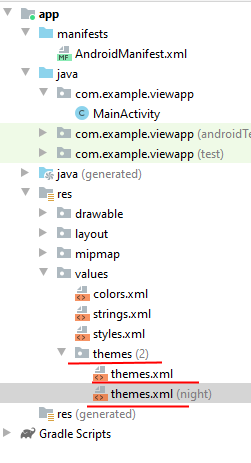
Один файл представляє світлу тему, а інший — темну. Наприклад, розглянемо файл themes.xml, який визначає світлу тему:
<resources xmlns:tools="http://schemas.android.com/tools">
    <!-- Базова тема додатка -->
    <style name="Theme.ViewApp" parent="Theme.MaterialComponents.DayNight.DarkActionBar">
        <!-- Основний колір бренду -->
        <item name="colorPrimary">@color/purple_500</item>
        <item name="colorPrimaryVariant">@color/purple_700</item>
        <item name="colorOnPrimary">@color/white</item>
        <!-- Вторинний колір бренду -->
        <item name="colorSecondary">@color/teal_200</item>
        <item name="colorSecondaryVariant">@color/teal_700</item>
        <item name="colorOnSecondary">@color/black</item>
        <!-- Колір статус-бара -->
        <item name="android:statusBarColor" tools:targetApi="l">?attr/colorPrimaryVariant</item>
        <!-- Налаштуйте вашу тему тут -->
    </style>
</resources>
Опис теми:
- Тема визначається за допомогою елемента
<style>. - Атрибут
parentвказує на батьківську тему, від якої поточна тема успадковує всі стилі. У цьому прикладі темаTheme.ViewAppуспадковує стилі від темиTheme.MaterialComponents.DayNight.DarkActionBar. - Можна визначати власні стилі, наприклад, задавати атрибути
colorPrimary,colorSecondaryтощо.
Атрибути кольорів:
- Для властивості
colorPrimaryвикористовується ресурс@color/purple_500, який задає основний колір бренду. - Семантичні імена (наприклад,
colorPrimary) полегшують роботу з темами.
Зміна кольорів:
Для зміни вигляду можна змінити значення властивості, наприклад:
<item name="colorPrimary">#1565C0</item>
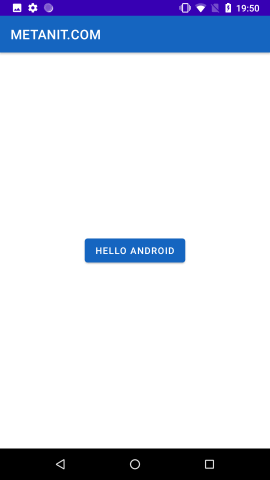
Це змінить колір фону заголовка та кнопки.
Застосування зміненої теми:
<?xml version="1.0" encoding="utf-8"?>
<androidx.constraintlayout.widget.ConstraintLayout
    xmlns:android="http://schemas.android.com/apk/res/android"
    xmlns:app="http://schemas.android.com/apk/res-auto"
    android:layout_width="match_parent"
    android:layout_height="match_parent">

    <Button
        android:layout_width="wrap_content"
        android:layout_height="wrap_content"
        android:text="Hello Android"
        app:layout_constraintLeft_toLeftOf="parent"
        app:layout_constraintRight_toRightOf="parent"
        app:layout_constraintTop_toTopOf="parent"
        app:layout_constraintBottom_toBottomOf="parent"
        />

</androidx.constraintlayout.widget.ConstraintLayout>
При застосуванні зміненої теми колір кнопки та заголовка автоматично оновиться відповідно до нової характеристики colorPrimary.
Створення власної теми
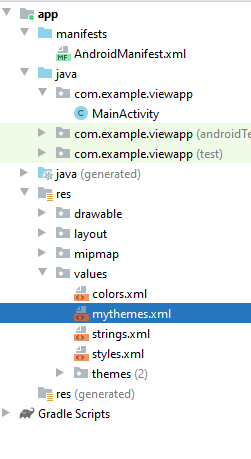
Замість використання вбудованих тем ми можемо створити свою. Для цього додаємо до папки res/values новий файл mythemes.xml і визначаємо в ньому наступне вміст:
<?xml version="1.0" encoding="utf-8"?>
<resources>
    <style name="MyTheme" parent="Theme.AppCompat.Light">
        <item name="android:textColor">#FF018786</item>
        <item name="android:textSize">28sp</item>
    </style>
</resources>
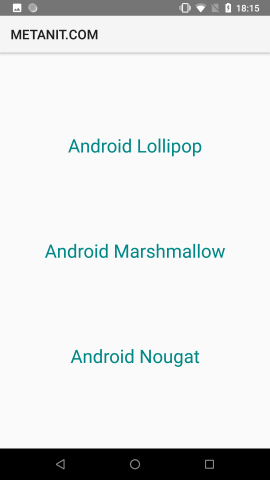
Отже, ми створили стиль "MyTheme", який успадковує стиль Theme.AppCompat.Light. В цьому стилі ми перевизначили дві властивості: висоту шрифта (textSize) — 28sp, а також колір тексту (textColor) — #FF018786.
Тепер визначимо цей стиль як тему для додатку в файлі AndroidManifest.xml:
<application
    android:allowBackup="true"
    android:icon="@mipmap/ic_launcher"
    android:label="@string/app_name"
    android:roundIcon="@mipmap/ic_launcher_round"
    android:supportsRtl="true"
    android:theme="@style/MyTheme"> <!-- застосування теми -->
Нехай у нас буде наступна розмітка в activity_main.xml:
<?xml version="1.0" encoding="utf-8"?>
<androidx.constraintlayout.widget.ConstraintLayout
    xmlns:android="http://schemas.android.com/apk/res/android"
    xmlns:app="http://schemas.android.com/apk/res-auto"
    android:layout_width="match_parent"
    android:layout_height="match_parent">

    <TextView
        android:id="@+id/textView1"
        android:layout_width="0dp"
        android:layout_height="wrap_content"
        android:gravity="center"
        android:text="Android Lollipop"
        app:layout_constraintLeft_toLeftOf="parent"
        app:layout_constraintRight_toRightOf="parent"
        app:layout_constraintTop_toTopOf="parent"
        app:layout_constraintBottom_toTopOf="@+id/textView2"
        />
    <TextView
        android:id="@+id/textView2"
        android:layout_width="0dp"
        android:layout_height="wrap_content"
        android:gravity="center"
        android:text="Android Marshmallow"
        app:layout_constraintLeft_toLeftOf="parent"
        app:layout_constraintRight_toRightOf="parent"
        app:layout_constraintBottom_toTopOf="@+id/textView3"
        app:layout_constraintTop_toBottomOf="@+id/textView1"
        />
    <TextView
        android:id="@+id/textView3"
        android:layout_width="0dp"
        android:layout_height="wrap_content"
        android:gravity="center"
        android:text="Android Nougat"
        app:layout_constraintLeft_toLeftOf="parent"
        app:layout_constraintRight_toRightOf="parent"
        app:layout_constraintBottom_toBottomOf="parent"
        app:layout_constraintTop_toBottomOf="@+id/textView2"
        />

</androidx.constraintlayout.widget.ConstraintLayout>
Як видно, для елементів TextView не встановлено атрибути textSize та textColor, але оскільки вони визначені в темі, яка застосовується глобально до нашого додатку, елементи TextView будуть використовувати ці стилі.
Застосування теми до activity
Раніше теми застосовувалися глобально до всього додатку. Однак також можна застосувати їх до окремого класу Activity. Для цього потрібно змінити файл манифеста AndroidManifest.xml. Наприклад:
<?xml version="1.0" encoding="utf-8"?>
<manifest xmlns:android="http://schemas.android.com/apk/res/android"
    package="com.example.viewapp"
    android:versionCode="1"
    android:versionName="1.0">

    <application
        android:allowBackup="true"
        android:icon="@mipmap/ic_launcher"
        android:label="@string/app_name"
        android:roundIcon="@mipmap/ic_launcher_round"
        android:supportsRtl="true"
        android:theme="@style/Theme.ViewApp">

        <activity android:name=".MainActivity" android:theme="@style/MyTheme">
            <intent-filter>
                <action android:name="android.intent.action.MAIN" />
                <category android:name="android.intent.category.LAUNCHER" />
            </intent-filter>
        </activity>
    </application>

</manifest>
Атрибут android:theme елемента <activity> вказує на тему, яку застосовують до MainActivity. Тобто глобально до додатку застосовується тема "Theme.ViewApp", а до MainActivity — "MyTheme".
Застосування теми до ієрархії віджетів
Також можна застосувати тему до ієрархії віджетів, встановивши атрибут android:theme у елементі, до якого (включаючи його вкладені елементи) ми хочемо застосувати тему. Наприклад, застосування теми до ConstraintLayout і його елементів:
<?xml version="1.0" encoding="utf-8"?>
<androidx.constraintlayout.widget.ConstraintLayout
    xmlns:android="http://schemas.android.com/apk/res/android"
    xmlns:app="http://schemas.android.com/apk/res-auto"
    android:layout_width="match_parent"
    android:layout_height="match_parent"
    android:theme="@style/MyTheme">

    <TextView
        android:id="@+id/textView1"
        android:layout_width="0dp"
        android:layout_height="wrap_content"
        android:gravity="center"
        android:text="Android Lollipop"
        app:layout_constraintLeft_toLeftOf="parent"
        app:layout_constraintRight_toRightOf="parent"
        app:layout_constraintTop_toTopOf="parent"
        app:layout_constraintBottom_toBottomOf="parent" />

</androidx.constraintlayout.widget.ConstraintLayout>